🏄 Surf Forecast MCP Server - Wave Conditions for AI Agents
What is MCP?
The Model Context Protocol (MCP) is an open standard developed by Anthropic that enables AI assistants to securely connect with external data sources and tools. Think of it as a universal adapter that allows LLMs to interact with databases, APIs, file systems, and other services in a standardized way. Instead of each AI assistant implementing custom integrations, MCP provides a common protocol where servers expose capabilities (tools, resources, and prompts) that any MCP-compatible client can consume. This architecture makes AI assistants vastly more powerful by giving them access to real-time data and the ability to perform actions beyond their training data.
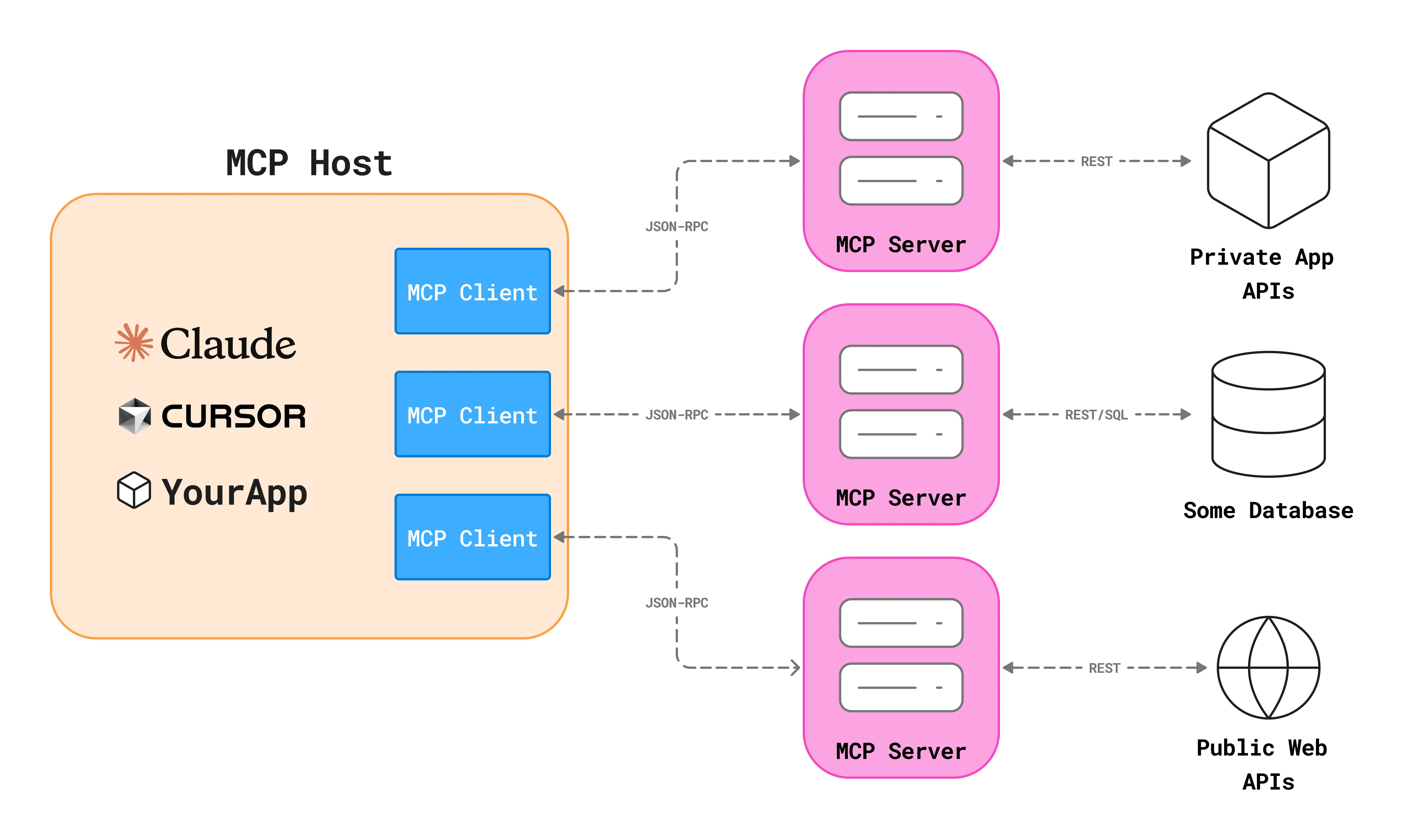
Leveraging this powerful protocol, I built an MCP server that provides comprehensive surf forecasts for any coastal location worldwide, enabling AI assistants to deliver real-time wave conditions and intelligent surf quality assessments.
The Surf Forecast MCP Server transforms complex marine weather data into actionable surf intelligence, making it easy for surfers and water sports enthusiasts to plan their sessions through conversational AI interfaces.
🌊 What is the Surf Forecast MCP Server?
This MCP server acts as a bridge between AI assistants (like Claude Desktop, Cline, or any MCP-compatible client) and global marine weather APIs. It provides:
- Real-time surf conditions - current wave height, period, and direction
- Wind analysis - wind speed, direction, and gusts in nautical units
- 5-day forecasts - daily predictions for session planning
- Intelligent assessments - surf quality interpretation based on conditions
- Global coverage - any coastal location via simple city name input
🏗️ Architecture & Design
The project follows clean architectural principles with clear separation of concerns:
Project Structure
1
2
3
4
5
6
7
8
9
10
11
12
surf-forecast-mcp/
├── server.py              # MCP server with tool definitions
├── models/
│   └── __init__.py       # Pydantic data models with validation
├── api/
│   ├── geocoding.py      # Nominatim geocoding client
│   ├── marine.py         # Open-Meteo marine weather client
│   └── weather.py        # Open-Meteo weather forecast client
├── services/
│   ├── forecast.py       # Surf forecast business logic
│   └── helpers.py        # Direction formatting utilities
└── requirements.txt      # Dependencies
Design Principles
Separation of Concerns:
models/- Data structures and validation rules using Pydanticapi/- External integrations with weather APIsservices/- Business logic and data transformationserver.py- MCP interface and tool definitions
This modular design ensures maintainability and makes it easy to extend or modify individual components without affecting others.
🔧 MCP Primitives Implementation
The server implements three types of MCP primitives:
1. Tool: get_surf_forecast
The main functionality - retrieves comprehensive surf data for any location.
Input: Simply provide a city name (e.g., “Livorno”, “San Diego”, “Biarritz”)
Output: Structured forecast including:
- Current wave conditions (height, period, direction)
- Swell components vs wind waves
- Wind speed and direction in knots
- Hourly forecast for the next 12 hours
- 5-day daily forecast
- Surf quality assessment
2. Resource: surf://info
Provides server information including capabilities, data sources, and usage guidelines.
3. Prompt: analyze_surf_conditions
Generates a structured prompt for analyzing surf conditions at a specific location, guiding the LLM to provide actionable recommendations including:
- Quality assessment
- Best timing for surfing
- Forecast trends
- Skill level guidance
🌐 Data Sources & APIs
The server aggregates data from multiple sources:
Open-Meteo Marine API
- Global coverage at 5km resolution
- Hourly and daily wave forecasts
- Wave parameters (significant height, swell, wind waves)
- Wave direction and period data
Open-Meteo Weather API
- Wind speed, direction, and gusts (in knots)
- Air temperature forecasts
- Hourly and daily predictions
Nominatim Geocoding
- Converts city names to coordinates
- Provides full location names
- Free OpenStreetMap-based service
All APIs are free for non-commercial use, making this an accessible solution for personal projects.
📝 LLM-Optimized Output Format
The forecast is returned as formatted text rather than JSON, optimized for LLM context consumption.
Usage Example
This code shows the exact output that an MCP client receives from get_surf_forecast():
1
2
3
4
5
6
7
8
9
10
11
12
13
from api import geocode_location, fetch_marine_forecast, fetch_weather_forecast
from services import ForecastService

# simulate calling get_surf_forecast("Livorno")
latitude, longitude, full_location = geocode_location("Livorno")
marine_data = fetch_marine_forecast(latitude, longitude)
weather_data = fetch_weather_forecast(latitude, longitude)
forecast = ForecastService.parse_forecast_data(
    marine_data, weather_data, full_location, latitude, longitude
)

# this is the exact output an mcp client receives:
print(forecast.to_llm_context())
Example Output
1
2
3
4
5
6
7
8
9
10
11
12
13
14
15
16
17
18
19
20
21
22
23
24
# Surf Forecast: Livorno, Toscana, Italia

## Current Conditions
Waves: 1.2m (9s period)
  - Swell: 0.9m from W
  - Wind waves: 0.3m
Wind: 9 knots from W (gusts 12 knots)
Temperature: 19°C

## Next Hours
03:00: 1.3m waves (swell 1.0m from W), 10kn wind from W
06:00: 1.4m waves (swell 1.1m from W), 11kn wind from W
...

## 5-Day Forecast
2025-11-10:
  Waves: 1.5m max (swell 1.1m from W)
  Wind: 12 knots from W
  Temp: 16-22°C
...

## Surf Quality
good wave height for most surfers | light breeze - good conditions |
moderate period - decent wave quality | swell dominant - cleaner conditions
🚀 Deployment Options
Local Development
1
2
3
4
5
6
7
# Install dependencies
pip install -r requirements.txt

# Run the server
python server.py

# Connect with any MCP client
Cloud Deployment
Deploy to FastMCP Cloud in minutes:
- Create a FastMCP Cloud account
- Connect your GitHub account
- Deploy this repository
- Your server is instantly available to any MCP client
🔗 GitHub Repository
Visit the project repository here for accessing the codebase (if you enjoyed this content please consider leaving a star ⭐).
Built with FastMCP and powered by Open-Meteo